Image via Complex
Apple is currently halfway through its two-year plan to switch from Intel processors to its own Apple Silicone. Up to this point, Apple users have seen the Macbook Air, the Macbook Pro 13-in., and Mac Mini all powered by the M1 chip, and this week Apple is adding the 24-in. iMac to that lineup. But what did Apple change, and is a Desktop computer something the average consumer would want in 2021?
We got our hands on Apple’s iMac 24-in., and after a brief tutorial of what we were to look out for, we got to work, spending our life with the 24-in. iMac for a weekend. Here’s what we learned about the iMac, what we liked, and if we think this will be the centerpiece of our lives. A forever computer, if you will.
Colors
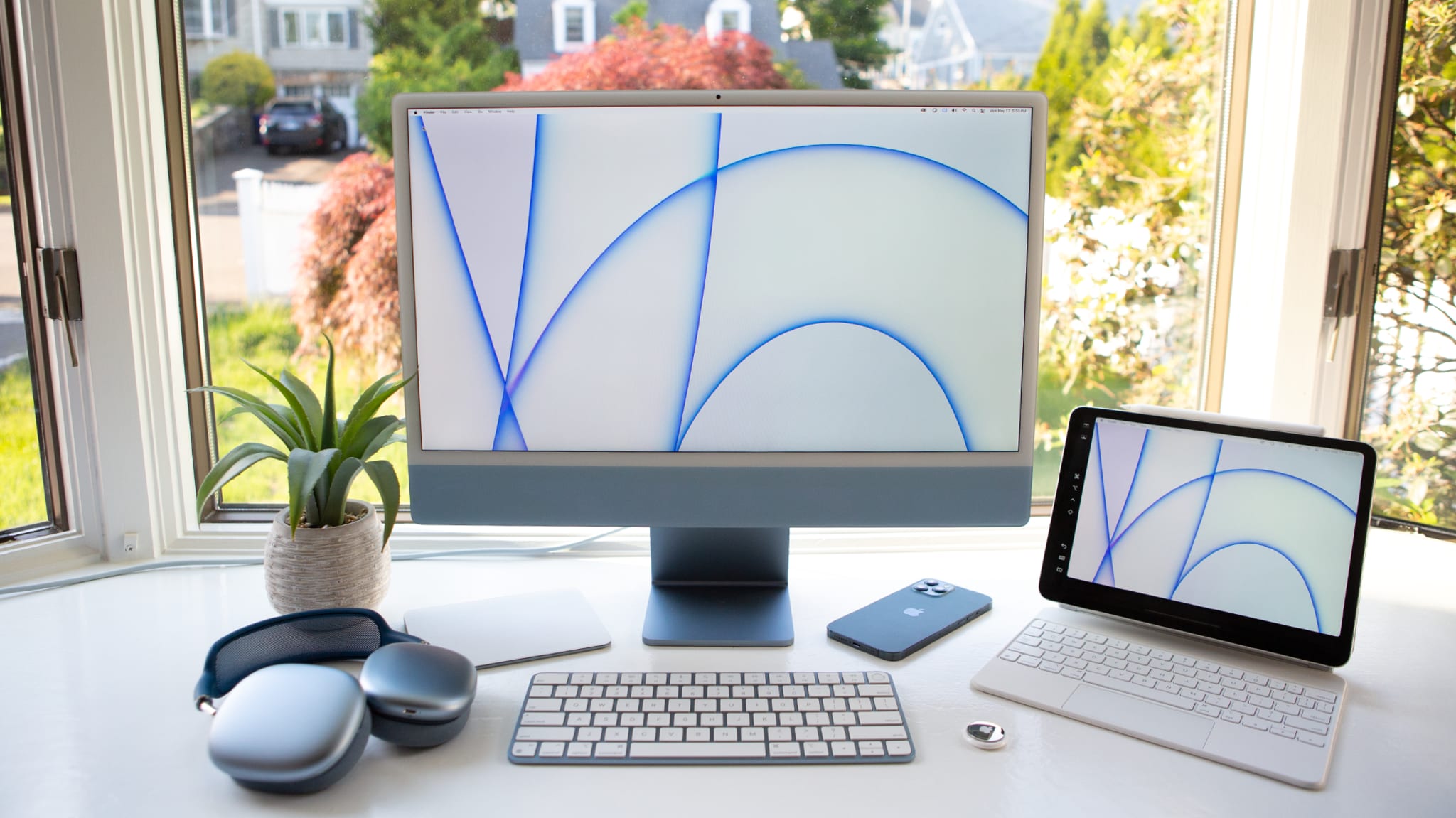
The iMac was originally introduced way back in 1998, and a year later at MacWord in 1999, Steve Jobs would wow audiences with the introduction of five new colors. But as the iMac switched designs and models over the years, the pops of color did not come with it. This was all rectified when Apple announced the new colors available in 2021 24-in. iMac line of computers.
Desktop computers both all-in-one and with a tower and screen, have usually been available in white, black, and RGB for gamers. These types of configuration are often regulated to the office, and meant to sit in a corner. This personalization of color allows the user to make a conscious choice about their computer and how it’ll fit into their existing color schemes and decorations. This iMac is designed to look good from all angles. The iMac starts at $1299 and is available in blue, green, pink, and silver. In the $1499 configuration, the computer is available in a few extra colors which include blue, green, pink, silver, yellow, orange, and purple.
Do people need desktop computers?
Anecdotally speaking I’ve noticed, if people own a personal computer they typically own a laptop. And with the increasing ability to work directly from smartphones, the laptop’s position as king computer seems to be regulated to work that requires a little more space and time. Where does an all-in-one desktop computer fit into peoples’ lives?
The Out-of-Office Computer
If quarantine has taught us anything, it is that every room in our homes can be a makeshift office. This is a good and a bad thing. Good, because we get to make decisions on where we’d like to work. However, it’s bad because the already extremely blurred line between work and life balance has become a hazy fog, and it’s often hard to separate the two ideas.
Having a computer that just sits in a room that requires going to a space, even a shared space, puts me in a headspace of “that’s my work area, I’m going to go there to do work, and when I’m not there I’m going to take a break and unwind.” In the instances where I want to do work elsewhere, there’s always my work laptop, phone, or iPad, but it helps me make the conscious decision to build a mental wall between work and life.
That being said, I think the place the iMac will take up in our homes and hearts is the space normally occupied by a small bedroom, kitchen, or living room TV. The screen and audio features on the iMac are made for entertainment. For what it’s worth, this makes for an extremely good streaming device that isn’t locked down by the restrictions of your average smart TV, the ability to work or conference call from it, helps bring to the table features that the average smart TV doesn’t have. Having a device that’s able to do multiple things helps free up space in a time where we’re all spending more time occupying that space. The only thing I’d say is missing is the ability to plug an HDMI into the computer to make use of its beautiful screen with Xbox Series X or PlayStation 5, but both consoles have the ability to do remote play, so with a good-enough internet connection and home network, you can still make use of the screen that way.
Thinness and Size
The screen is thin—crazy thin at 11.5 mm thick. To give you a comparison, the iPhone 12 Pro Max is 7.4 mm thick. If you stacked two iPhones on top of each other, it’d be thicker than this computer screen. That’s bonkers. The pictures don’t do justice to how crazy it looks. But the thinness does not equate to fragility; the screen still feels solid and well manufactured.
Thinness is not the only place where the iMac has been reduced. I have been using iMacs since 2010, when I purchased a 27-in. iMac. That beast of a computer was able to do everything I needed from editing video, to design, and animation. That bad boy clocked in at about 30.5 lbs. When I unboxed this Mac, I was shocked by how light it seemed. The last 21.5in iMac was 12.5 lbs, and this new iMac with a larger 24-in screen weighs less at less than 10 lbs. The overall volume and space it occupies was reduced by more than 50%.
[Ed note: It’s hard to describe how insane this really is. While it’s thin, it feels sturdy. How they get that great of a screen, with that sound, inside of an enclosure this thin, is astonishing.]
Prosumer
This computer likely will be more than fast enough for the average consumer. During my time testing this computer I’ve been trying to push the limits. I’ve kept every tab open, every program going, and Zoom calls, Google Docs, photo editing, and some light video editing later, this computer is still snappy. On a day to day, I’m using Photoshop, Premiere, After Effects, and Illustrator, and while not all of those programs are fully optimized yet as universal apps, they all still run very well. Once they have universal apps, it is more than likely that they will run even better.
Benchmarks and stress tests aside, the performance seen on this iMac may be similar to that great performance seen in other M1 macs. The other side of that two-year Apple Silicon transition likely included a 27-in. iMac update and a MacPro update. If power is a concern you could always wait until those are announced sometime in the future.
Having a desktop computer comes with the disadvantage of decreased mobility. While the only wire you’ll have hanging from this computer will be the power cord since the stand keyboard, and mouse are both wireless, moving any desktop computer can be taxing no matter the size and shape. One thing Apple has done to combat that is a series of continuity features that help your iPhone, iMac and iPad all talk with each other.
Hand-Off, for example works, makes it so you can start a task in one device in one program (Mail, Maps, Safari, etc.) and can continue it on a different device. Universal Clipboard makes it so that anything you copy in one device you can paste on another. Continuity Camera has the ability to scan a document on your iPhone, then have it appear on your Mac. A favorite of mine is Sidecar, a feature that lets the user use an iPad as a secondary display, and to use the Apple Pencil as an input device, similar to the way a Wacom tablet works.
The screen
The 4.5K screen is super sharp. This resolution is great for editing 4K footage, editing large photos, or just chilling with Netflix. It’s beautiful, and if you planned on using it as a device to stream to, then it has plenty of good viewing angles because of its anti-reflective coating. The larger 27” iMac has a 5K screen. Since the 21” screen is smaller than the 27” screen. the 4.5K screen makes sense, The smaller a screen is, the less resolution is necessary to make an image appear crisp.
The one thing that is conspicuously missing is the little Apple logo in the bottom of the screen, and for that matter, the bottom of the screen does have a rather large color area that just contains a lighter pastel color. While this design echoes back to the older iMac models, I can’t help but wonder if making the computer a few centimeters larger could have reduced the chin, but that being said, I spend my time staring at the top of the screen so that little chin does not really bother me.
"real Gs move in silence like lasagna"
Before we talk about the speakers, I think it makes sense to talk about how the computer itself sounds. HDDs and fans gave many older computers an omnipresent hum that just faded into the background as noise. The computer in general is pretty silent. I haven’t had the fans kick on, and it has a solid-state drive, which reduces the sound further. While this might not be something most people initially notice I’d compare it to the first time you get in a Prius or an electric car, when you notice, it’s kinda freaky, and when you are aware of how loud older cars/computers are you don’t know how you dealt with that in the first place.
The iMac has a six speaker sound system with two-force canceling woofers, tweeters, and Dolby Atmos. The sound is super crisp and immersive. This makes live music sound really good, and anything acoustic poppy or electronic sounds great. Hip-Hop sounds good, too, but I’m always looking for bass to hit me in the chest, which this doesn’t do. To be fair, though, no laptop or onboard speakers on TVs, computers, or laptops produce that super deep “I feel like I’m at a club” bass, so that expectation is unrealistic.
Apple did just announce their new lossless and spatial audio features that will be coming to Apple Music in June. The speakers on the iMac seem primed to showcase all that spatial audio will be bringing to the table. Spatial audio isn’t available with Apple Music at the time of this review, but I’m taking a guess that the speaker configuration will highlight those features.
Another note on immersive speakers: Facetime and Zoom calls sound a bit more like people are in the room with you, there seems to be some spatial depth when I’m chatting with people. The Microphone is good, too. I come across loud and clear and haven’t had any complaints.
Camera
Pre-quarantine, there wasn’t much if any focus on cameras for laptops and computers for most people outside of professional streamers that mostly rely on external solutions. This 1080p camera is really good, so much so that people in Zoom calls called it out without me mentioning I was reviewing an iMac. For conference calls, I like that it has a high angle, it’s very forgiving with my whole “I haven’t exercised much during quarantine,” look I’ve got going on. The giant screen also gives you nice even light during conference calls. The M1 chip and Neural Engine also do a good job of analyzing and improving upon the picture.
Pointing and clicking
From a design perspective the keyboard, Magic mouse, and trackpad are on point. That attention to detail is followed throughout the entire unboxing experience. The handle of the box is the same color as your iMac. The entire box is made of cardboard with no styrofoam, which is just nice considering the amount of little styrofoam balls I’ve recently noticed all over my rug after building furniture. There is an Easter egg during the unboxing of the screen protector having the famous Apple “hello.” The little details of all the metal and cables being the same shades of the same color help this iMac be a part of a cohesive ecosystem.
Image via Apple
The TouchID fingerprint scanner is dope and comes standard with the $1499 model. Having TouchID greatly reduces the amount of time I’m entering in passwords when turning on the iMac or during program installations. The keyboard is nice and clicky and responsive, and I can’t complain about it. There is a new Emoji Key which helps with tweets, and generally any time you are trying to bring levity to a situation. The spotlight button is nice too for those who never knew that command spacebar was the hotkey for that function.
Ports
The last thing to talk about are the ports. In another victory for cable management the Ethernet port is located on the power adapter on the $1499 model and is an option on the $1299 model. The computer only uses USB-C shaped ports and comes with two Thunderbolts / USB four ports, and can expand up to two more USB three ports on the model that starts at $1499.
If you want to make the jump into having a desktop computer, this is a great computer for you. Considering this is a more consumer to prosumer model, it still packs a punch when it comes to power. It really makes me excited to see what’s coming up with Apple’s Pro line of computers MacPro, MacBook Pro 16-in. and iMac 27-in. / 5K versions.
That being said, if you are going to pony up the $1299 it costs to buy an iMac it makes sense to just go ahead and get the $1499 model. The extra ports, the touch ID, an extra GPU-core, and the upgraded ethernet port on the power adapter are all just enough to make the upgrade make sense. If none of those things are important to you then stick with the $1299 model. The iMac is currently available for preorder and will begin arriving to customers Friday, May 21.